






Bit by bit, we’ve been exploring various bits in the serializer and deserializer to indicate that video is flowing. These are helpful first steps, but what if we need to take it a step further to help identify specifically where a problem may be residing? This is where the video pattern generator feature of GMSL can assist. Whether your video source is having issues with generating video or you just need help validating a section of the signal chain, we will explore the insights that the video pattern generator can provide.
Video Test Patterns
Test patterns have been used since the early days of video transmission for calibration, alignment, and general troubleshooting. A known good pattern is very beneficial as a reference to compare the received signal against.
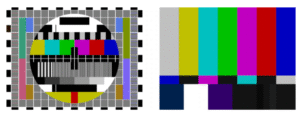
While these patterns were more geared towards analog signals, the main benefit of a known pattern remains the same today. Since the GMSL physical layer interfaces are all digital, we can compare the 1s and 0s of a received signal because we know the exact pattern that was transmitted for very accurate diagnosing.
GMSL Video Pattern Generator
Both serializer and deserializer devices can generate a pattern using the video pattern generator (VPG) or patgen for shorthand. The VPG parameters are fully configurable and conveniently located in the GMSL GUI, allowing you to tweak and tune the video timings of the resolutions, frame rate, and sync polarities.
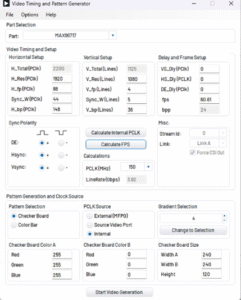
Additionally, all GMSL parts offer two test pattern options for debugging: a checkerboard and a color bar/gradient. Both have customization options to help test specific scenarios.
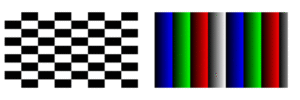
For camera/sensor applications, it is important to note that the VPG runs only in pixel mode with the datatype being RGB888, which may require some minor tweaks to the system.
Also, some GMSL devices can generate an internal clock for the VPG, but others may require an external clock source or source video port clock.
Debugging Steps
When I think about a GMSL link, I think about it in three sections:
- Video Source (input PHY): the video that inputs to the serializer video receiver
- GMSL Link (GMSL PHYs): the connection from GMSL transmitter to GMSL receiver
- Video Sink (output PHY): the video outputs from the deserializer video transmitter
Each of these three sections can provide a different perspective on where an error can occur.
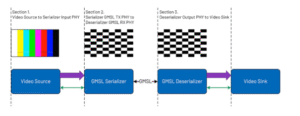
Personally, I like to validate the signal chain starting at the video sink and working back to the source. If the issue is in the final section of the signal chain, then any debugging done at the other two sections of the signal chains could provide erroneous observations or cause two issues to cancel each other out.
Notice above that the video source is also able to generate its own test pattern, which is extremely helpful alongside the GMSL test patterns. Sometimes the video source may also have an issue, and the test pattern can help with those configuration issues.
With this perspective, here is what each section could provide insight into when using pattern generation:
- Section 3: will confirm deserializer output configuration and any potential routing issues.
- Section 2: will confirm the GMSL link configuration.
- Section 1: will confirm serializer input configuration, video source configuration, and any potential routing issues.
Conclusion
The GMSL video pattern generator stands out as an indispensable tool for anyone working with video signal chains. Its ability to generate known patterns not only helps in validating the integrity of your hardware and software configurations but also provides a clear, systematic approach to debugging. From identifying faulty video sources to fine-tuning GMSL links, the VPG is your go-to solution for ensuring everything works seamlessly.
Keep an eye out for our upcoming blog, where we will explore part-specific registers for even more advanced troubleshooting techniques.